Manufacturing Mode activated and can't be disabled
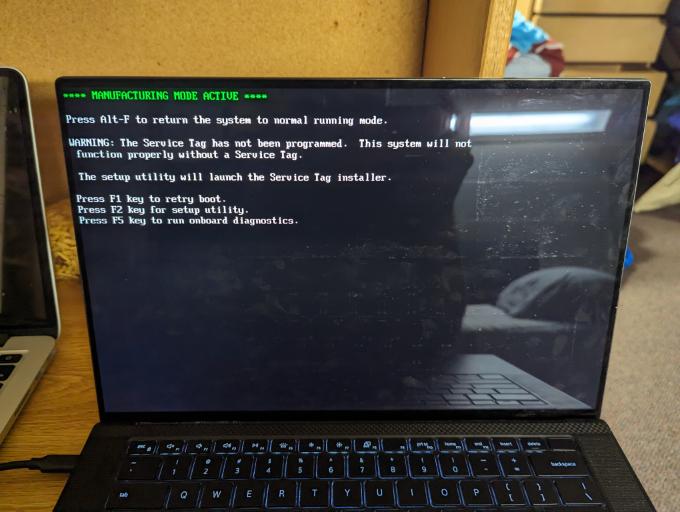
To deactivate Manufacturing Mode on a Dell laptop, follow these steps carefully:
🛠️ Method 1: Disable via BIOS Setup
- Restart your laptop.
- Immediately press
F2when the Dell logo appears to enter BIOS/System Setup. - Once inside BIOS, press
Alt + Fto disable Manufacturing Mode. - If prompted, enter your Service Tag (usually found on a sticker on the bottom of your laptop).
- Save changes and exit BIOS.
- Restart your laptop to confirm the mode is disabled.
If the message “Manufacturing Mode is Detected” still appears, repeat the steps above.
🧩 Common Cause: Missing Service Tag
Manufacturing Mode is often triggered when the Service Tag is not programmed in BIOS. If the tag is missing or not saving:
- Try updating to the latest BIOS version from Dell’s official support site.
- Re-enter the Service Tag in BIOS and apply changes.
- If BIOS refuses to save the tag, it may indicate a motherboard issue or firmware bug.
🧪 Alternate Shortcut
Some users report success using:
Fn + Xduring boot to exit Manufacturing Mode
📺 Video Guide
You can also check out this YouTube tutorial for a visual walkthrough on disabling Manufacturing Mode and fixing Service Tag issues.