POWER ON NO DISPLAY TROUBLESHOOTING
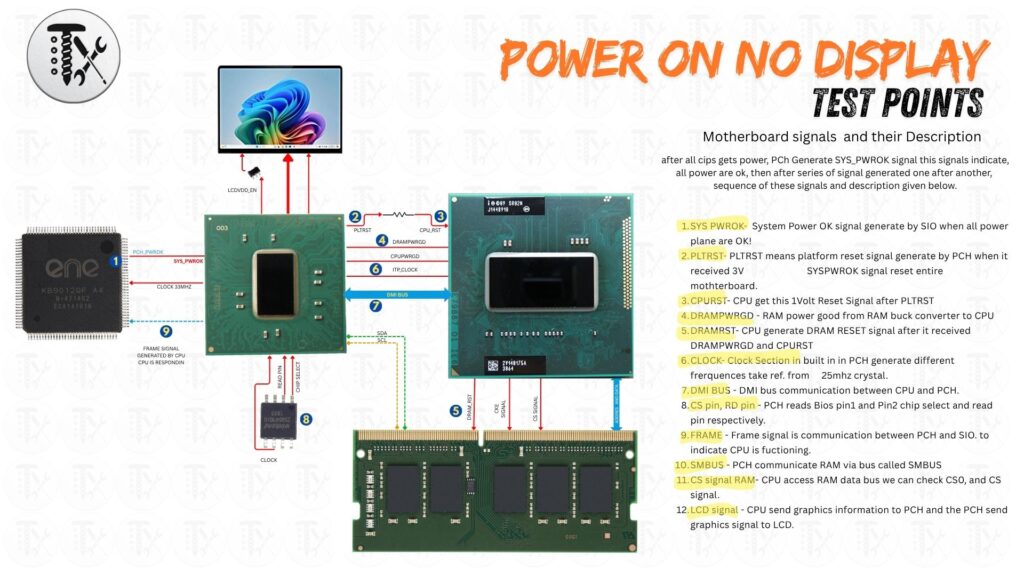
🛠️ If your laptop powers on but shows no display, here’s a basic troubleshooting checklist to help you narrow down the issue:
🔌 1. Check Power and Connections
- Ensure the power adapter is plugged in and the battery is charged.
- Look for signs of life: fan noise, LED indicators, keyboard backlight.
- Try a hard reset: unplug charger, remove battery (if possible), hold power button for 15 seconds, then reconnect and power on.
🖥️ 2. Test with an External Monitor
- Connect your laptop to an external display via HDMI or VGA.
- If the external monitor works, the issue may be with the laptop screen or backlight.
💡 3. Use the Bright Light Test
- Shine a flashlight directly on the screen. If you see a faint image, the backlight or inverter may be faulty.
🧠 4. Reseat or Replace RAM
- Remove and reinsert RAM sticks one at a time.
- Try using a known working RAM stick if available.
⚙️ 5. Boot into Safe Mode
- Force shutdown and restart multiple times to trigger Windows Recovery Environment.
- Choose “Safe Mode” to check if the issue is software-related.
🔄 6. Reset BIOS or CMOS
- Some laptops allow BIOS recovery by pressing specific keys (e.g., Ctrl + Esc while plugging in power).
- You can also try removing the CMOS battery (if accessible) for a few minutes.
🧰 7. Update or Reinstall Drivers
- If you can boot into Safe Mode or external display works, update graphics drivers via Device Manager.
🧪 8. Consider Hardware Failure
- If none of the above work, the issue could be with the motherboard, GPU, or screen cable.
- Seek professional repair if you're not comfortable opening the laptop.